Choose Your Desired Option(s)
Here is an SEO-optimized product description for your Video to GIF / GIF to Video Converter PHP Script, designed to rank high and maximize conversions.
Product Title:
Video to GIF / GIF to Video Converter PHP Script – 2-Way Converter | Optimize, Resize, Add Text & More
Meta Description (150–160 chars):
Convert video to GIF and GIF back to video with our PHP script. Optimize, resize, add text watermarks, extract frames, and more. Launch your tool today.
Product Description:
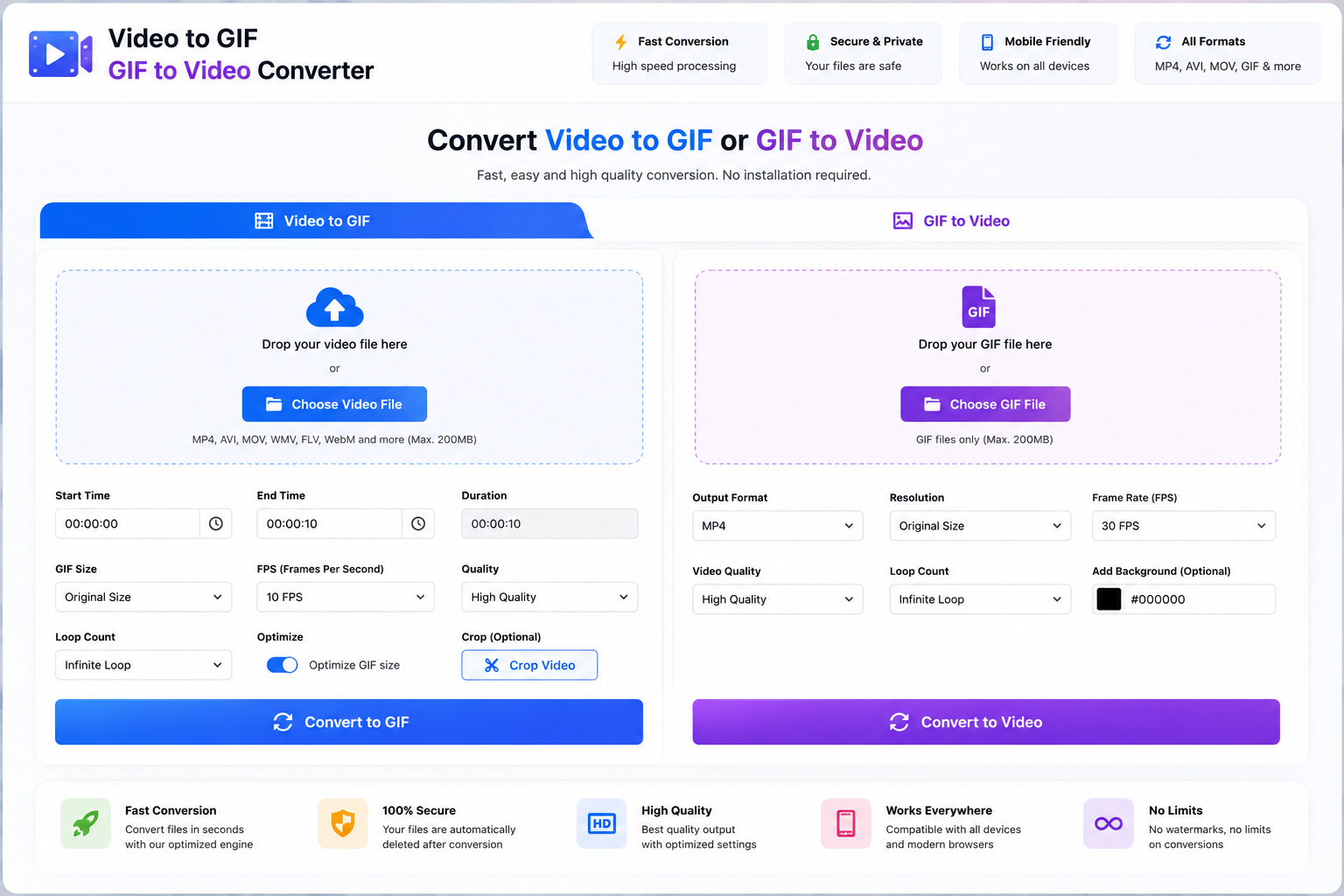
🎞️ Launch Your Own Professional GIF Converter Website – 2-Way Conversion
GIFs are everywhere – from social media reactions and memes to marketing content and product demos. Over 10 million GIFs are shared daily on platforms like Twitter, Facebook, Slack, and WhatsApp. But creating the perfect GIF from a video – or converting a GIF back to video – requires specialized tools.
Now you can launch your very own Video to GIF / GIF to Video Converter PHP Script – a complete, two-way media conversion website that offers 20+ powerful GIF and video processing tools in one place.
Convert video to GIF, GIF to video, optimize, resize, crop, add text, reverse, speed up, slow down, extract frames, and so much more – all directly in the browser. No FFmpeg expertise needed. 100% self-hosted.
🔥 20+ Powerful Tools Included:
🎬 Video to GIF (Video → GIF)
| Tool | Function |
|---|---|
| Video to GIF | Any video format (MP4, AVI, MOV, MKV, WebM) → Animated GIF |
| Trim by Time | Select specific start/end time (seconds or HH:MM:SS) |
| Trim by Frames | Select specific frame range |
| Quality Adjustment | Low / Medium / High / Best |
| Color Reduction | 2 to 256 colors (smaller file size) |
| Dithering | Improve quality with fewer colors |
| Remove Duplicate Frames | Reduce file size |
🎞️ GIF to Video (GIF → Video)
| Tool | Function |
|---|---|
| GIF to MP4 | Animated GIF → MP4 video |
| GIF to WebM | Animated GIF → WebM video |
| GIF to AVI | Animated GIF → AVI video |
| GIF to MOV | Animated GIF → QuickTime video |
| Preserve Transparency | Keep alpha channel (WebM) |
| Loop Count Setting | 0 = infinite, 1-100 times |
📏 GIF Optimization & Editing
| Tool | Function |
|---|---|
| Compress GIF | Reduce file size by up to 80% |
| Resize GIF | Change dimensions (maintain aspect ratio) |
| Crop GIF | Remove edges from animated GIF |
| Optimize GIF | Remove unnecessary frames/colors |
| Change Frame Rate | Adjust FPS (1-60) |
| Set Loop Count | Infinite or specific number |
| Reverse GIF | Play GIF backwards |
| Speed Up GIF | 1.5x, 2x, 3x, 4x faster |
| Slow Down GIF | 0.75x, 0.5x, 0.25x slower |
| Add Text Overlay | Custom text on GIF |
| Add Image Watermark | Logo on GIF |
| Extract All Frames | GIF → individual PNG/JPG images |
| Extract Specific Frame | Export single frame |
🎨 Video Editing (Before GIF Conversion)
| Tool | Function |
|---|---|
| Crop Video | Remove edges before converting |
| Resize Video | Change dimensions before GIF |
| Rotate Video | 90°, 180°, 270° |
| Flip Video | Horizontal / vertical |
| Adjust Speed | Slow motion or fast motion |
| Extract Audio | Video → MP3 (bonus tool) |
🖼️ Frame Extraction & Preview
| Tool | Function |
|---|---|
| Video to Frames | Extract all frames as images |
| GIF to Frames | Extract all GIF frames |
| Preview Frames | Visual timeline for trimming |
| Thumbnail Grid | 3×3, 4×4 preview grid |
| Select Start Frame | Click on thumbnail to set start |
| Select End Frame | Click on thumbnail to set end |
📦 Batch Processing
| Tool | Function |
|---|---|
| Batch Convert | Multiple videos → GIFs |
| Batch Optimize | Multiple GIFs at once |
| ZIP Download | Download all results as ZIP |
⚡ Key Features:
🚀 Powered by FFmpeg & ImageMagick
- Industry-standard processing engines
- Supports 200+ video formats
- High-quality GIF output
- Runs entirely on your server
⚡ Real-Time Preview
- Live frame preview before conversion
- Adjust start/end points visually
- See estimated GIF size
- Preview GIF before downloading
🎯 Precision Trimming
- Trim by time (seconds/milliseconds)
- Trim by frame number
- Visual timeline slider
- Keyboard shortcuts (← → for prev/next frame)
📱 Fully Responsive
- Works on desktop, tablet, and mobile
- Touch-friendly timeline control
- Bootstrap 5 framework
💰 Monetization Ready
- AdSense integration
- Premium features (faster processing, higher quality)
- Daily conversion limits for free users
- Watermark on free output (Pro feature to remove)
🔒 Secure & Private
- Automatic file cleanup (delete after 1 hour)
- No database storage of user files
- XSS, CSRF protection
- HTTPS ready
🌍 Multi-Language Support
- 10+ languages included
- Easy to add new languages
📁 What You Get:
- ✅ Complete PHP source code (clean, well-commented)
- ✅ FFmpeg + ImageMagick integration
- ✅ Responsive frontend (Bootstrap 5)
- ✅ Admin dashboard
- ✅ Visual timeline frame picker
- ✅ Live GIF preview
- ✅ Batch processing queue
- ✅ Installation wizard
- ✅ PDF + video installation guide
- ✅ .htaccess with SEO-friendly URLs
- ✅ 6 months free updates
- ✅ 6 months email support
💡 Perfect For:
| Use Case | Why It Works |
|---|---|
| Social media marketers | Create engaging GIFs from product videos |
| Meme generator website | High-traffic viral tool |
| Content creators | Turn tutorials/clips into shareable GIFs |
| E-commerce sites | Product demo GIFs |
| Developers | API for GIF generation |
| Twitch streamers | Highlight clips to GIFs |
| Discord/Slack bot backend | Automated GIF creation |
📈 SEO Benefits Built-In:
| SEO Feature | Benefit |
|---|---|
| Multiple landing pages | /video-to-gif, /gif-to-video, /compress-gif, etc. |
| Clean URL structure | SEO-friendly URLs |
| Auto meta tags | Unique descriptions per tool |
| Schema markup | HowTo, Tool schema for rich snippets |
| XML sitemap | Auto-generated |
| Fast loading | Core Web Vitals ready |
| Mobile-first | Higher mobile rankings |
Sample keywords you can rank for:
- “Video to GIF converter”
- “GIF to video converter”
- “Compress GIF online”
- “Make GIF from video”
- “Reverse GIF online”
- “GIF resize tool”
- “Extract frames from GIF”
- “Optimize animated GIF”
🛠 Server Requirements:
| Requirement | Minimum | Recommended |
|---|---|---|
| PHP version | 7.4+ | 8.1+ |
| FFmpeg | 4.0+ | 6.0+ |
| ImageMagick | 6.9+ | 7.0+ |
| Web server | Apache/Nginx | Nginx + PHP-FPM |
| RAM | 1GB | 2GB+ |
| Storage | 10GB | 50GB+ (temp files) |
| Upload max size | 100MB | 500MB+ |
| Execution time | 300 seconds | Unlimited |
Required PHP extensions:
- cURL
- JSON
- fileinfo
- mbstring
- exec() enabled (for FFmpeg/ImageMagick)
- imagick (PHP extension, optional but recommended)
✅ Why Choose Our Video to GIF Converter Script?
| Feature | Free Online Tools | Competitors | Our Script |
|---|---|---|---|
| Self-hosted | ❌ | ⚠️ Some | ✅ Yes |
| No file size limits | ❌ (10-50MB typical) | ⚠️ | ✅ Yes |
| No watermark on output | ❌ (adds their logo) | ⚠️ Mixed | ✅ Yes |
| GIF to video conversion | ❌ | ✅ | ✅ Yes |
| Visual frame picker | ⚠️ Basic | ❌ | ✅ Advanced |
| Frame extraction | ❌ | ⚠️ Limited | ✅ Yes |
| Batch processing | ❌ | ❌ | ✅ Yes |
| One-time payment | N/A | Subscription | ✅ One-time |
🎁 Premium Features (Pro Version):
Upgrade to GIF Studio PRO for:
- ✅ AI GIF enhancement – Upscale GIF quality
- ✅ Add captions/subtitles – Burn text into GIF
- ✅ GIF to APNG – Animated PNG format
- ✅ GIF to WebP – Modern animated format
- ✅ Remove background – Chroma key from GIF
- ✅ Add transitions – Fade, wipe, zoom effects
- ✅ Meme text generator – Top/bottom text presets
- ✅ Watermark removal tool – Remove existing watermarks
- ✅ API access – Programmatic GIF generation
- ✅ White label license – Remove our branding
- ✅ Priority support – 24-hour response
- ✅ 1 year updates – Extended support
📸 What Your Website Looks Like:
Homepage:
- Hero: “Turn Videos into GIFs – Fast & Free”
- Two main cards: [Video to GIF] [GIF to Video]
- How it works (3 steps)
- Popular tools: Compress GIF, Reverse GIF, Resize GIF
Video to GIF Tool Page:
Step 1: Upload Video
┌─────────────────────────────────┐
│  Drag & drop video here or      │
│  [Browse Files]                  │
│  Supports: MP4, AVI, MOV, MKV   │
│  Max size: 500MB                 │
└─────────────────────────────────┘

Step 2: Trim (Optional)
├─────────────────────────────────┤
│ Preview Timeline:                │
│ [====|====|====|====]            │
│ Start: 00:00:05 ▼  End: 00:00:12▼│
│ Thumbnail preview grid (click to set)│
└─────────────────────────────────┘

Step 3: Settings
├─────────────────────────────────┤
│ Quality: ○ Low ○ Medium ● High ○ Best│
│ Colors: [256 ▼] (2-256)         │
│ Frame Rate: [15 ▼] FPS (1-60)   │
│ Loop: ● Infinite ○ 1x ○ Custom  │
│ Size: [Same as original ▼]      │
│ [x] Optimize (smaller file size)│
└─────────────────────────────────┘

Step 4: Convert
├─────────────────────────────────┤
│ Estimated Output Size: ~4.2 MB  │
│ [Convert to GIF]                │
│ Progress: ████████░░ 80%        │
└─────────────────────────────────┘

Step 5: Download
├─────────────────────────────────┤
│  GIF Preview (animated)          │
│  File size: 3.8 MB (↓9.5% from original)│
│  Dimensions: 640×360  |  Frames: 45│
│  [Download GIF] [Edit Again]    │
│  Share: 📘 🐦 📸                 │
└─────────────────────────────────┘
GIF to Video Tool Page:
Step 1: Upload GIF
┌─────────────────────────────────┐
│  Drag & drop GIF here            │
└─────────────────────────────────┘

Step 2: Settings
├─────────────────────────────────┤
│ Output Format:                   │
│ ● MP4 (Recommended)              │
│ ○ WebM (Transparent background) │
│ ○ AVI  ○ MOV                    │
│                                     │
│ Quality: ● High ○ Medium ○ Low  │
│ Frame Rate: Same as original ▼  │
│ Loop video: □ Yes (unchecked = plays once)│
└─────────────────────────────────┘

Step 3: Convert & Download
Compress GIF Tool:
Upload GIF: [Choose File]
Current size: 15.2 MB | 800×600 | 120 frames

Compression Level:
○ Mild (↓30-40%)  ○ Medium (↓50-60%)  ● Aggressive (↓70-80%)

Settings:
Colors: [128 ▼] (reduces size)
Remove duplicate frames: [✓]
Optimize palette: [✓]

[Compress GIF]
After compression: 3.8 MB (↓75%)
[Download]
📊 Admin Dashboard Features:
| Feature | Description |
|---|---|
| Dashboard | Total conversions, popular tools, storage used |
| Conversion logs | Files processed, sizes, timestamps |
| Queue manager | View pending jobs, cancel, retry |
| Quality presets | Configure default quality settings |
| File cleanup | Auto-delete temp files (set retention period) |
| Ad manager | Place ads on specific pages |
| Rate limiting | Max conversions per IP/day |
| Allowed formats | Enable/disable specific input formats |
| Watermark settings | Add default watermark to free outputs |
| Backup | One-click backup |
🚀 Quick Installation:
# 1. Install FFmpeg
sudo apt-get install ffmpeg

# 2. Install ImageMagick
sudo apt-get install imagemagick

# 3. Enable imagick PHP extension
sudo apt-get install php-imagick
sudo systemctl restart php8.1-fpm

# 4. Upload PHP script files

# 5. Run /install – follow wizard

# 6. Configure and launch!
Complete installation guide included for Ubuntu, CentOS, Debian, Windows Server.
🔗 Live Demo:
👉 [View Live Demo] – Test video to GIF and GIF to video conversion
Admin demo:
URL: yoursite.com/admin
Username: admin@gifconverter.com
Password: admin123
🛒 Pricing Plans:
| License | Price | Tools | Support | Updates | Domains |
|---|---|---|---|---|---|
| Regular | $XX | 20+ | 6 months | 6 months | 1 |
| Extended | $XX | 20+ | 1 year | 1 year | Unlimited |
| Pro | $XX | 30+ (AI tools) | 1 year | Lifetime | Unlimited |
| Agency | $XX | 30+ (AI tools) | 1 year | Lifetime | Unlimited + Resell |
[Buy Now – Add to Cart]
📞 Support & Guarantee:
- ✅ 30-day money-back guarantee – Full refund if not satisfied
- ✅ Email support within 24 hours
- ✅ Installation assistance (first 30 days free)
- ✅ FFmpeg/ImageMagick configuration help included
- ✅ Bug fixes free for life
🏷️ Tags / Keywords:
Video to GIF converter PHP script, GIF to video converter, animated GIF maker, compress GIF online, GIF optimization script, FFmpeg GIF script, video to animated GIF, make GIF from video, reverse GIF tool, resize GIF online, extract GIF frames, GIF editor PHP, media converter script, self-hosted GIF tool, monetizable GIF converter
Short Version (for marketplaces with character limits):
Video to GIF / GIF to Video Converter PHP Script – 2-way conversion with 20+ tools. Convert video to GIF (trim, quality, colors, optimize). Convert GIF to MP4/WebM. Also compress, resize, crop, reverse, speed change, extract frames, add watermarks. Powered by FFmpeg + ImageMagick. Responsive, AdSense ready. PHP 7.4–8.3. One-time payment. [Demo & Buy Now]
Alternative Headline Options:
- “GIF Studio – Video to GIF & GIF to Video Converter PHP Script”
- “Launch a GIF Converter Like Ezgif or GIPHY – Self-Hosted”
- “Ultimate GIF Toolkit – Convert, Optimize, Edit Animated GIFs”
- “2-Way GIF Converter PHP Script – Video ↔ GIF”
Sample Tool URLs (SEO structure):
yoursite.com/video-to-gifyoursite.com/gif-to-videoyoursite.com/compress-gifyoursite.com/reverse-gifyoursite.com/resize-gifyoursite.com/crop-gifyoursite.com/speed-gifyoursite.com/extract-framesyoursite.com/gif-to-mp4yoursite.com/mp4-to-gif
Bonus: GIF Optimization Tips for Users (Content for Your Blog):
| Tip | Description |
|---|---|
| Reduce colors | 256 → 128 colors = ~50% smaller |
| Lower frame rate | 30fps → 15fps = half the frames |
| Crop unnecessary areas | Remove borders/empty space |
| Shorten duration | Trim to essential content |
| Remove duplicate frames | Many GIFs have repeating frames |
| Use dithering | Better quality at lower color counts |
Comparison: GIF vs MP4 vs WebM
| Format | Best For | File Size | Transparency | Audio |
|---|---|---|---|---|
| GIF | Social media, memes, reactions | Large | No | No |
| MP4 | Video sharing, high quality | Small | No | Yes |
| WebM | Modern web, transparent BG | Small | Yes | Yes |
Your script converts between all three!
Related Products

Popular & Trending


Featured Products