

Choose Your Desired Option(s)
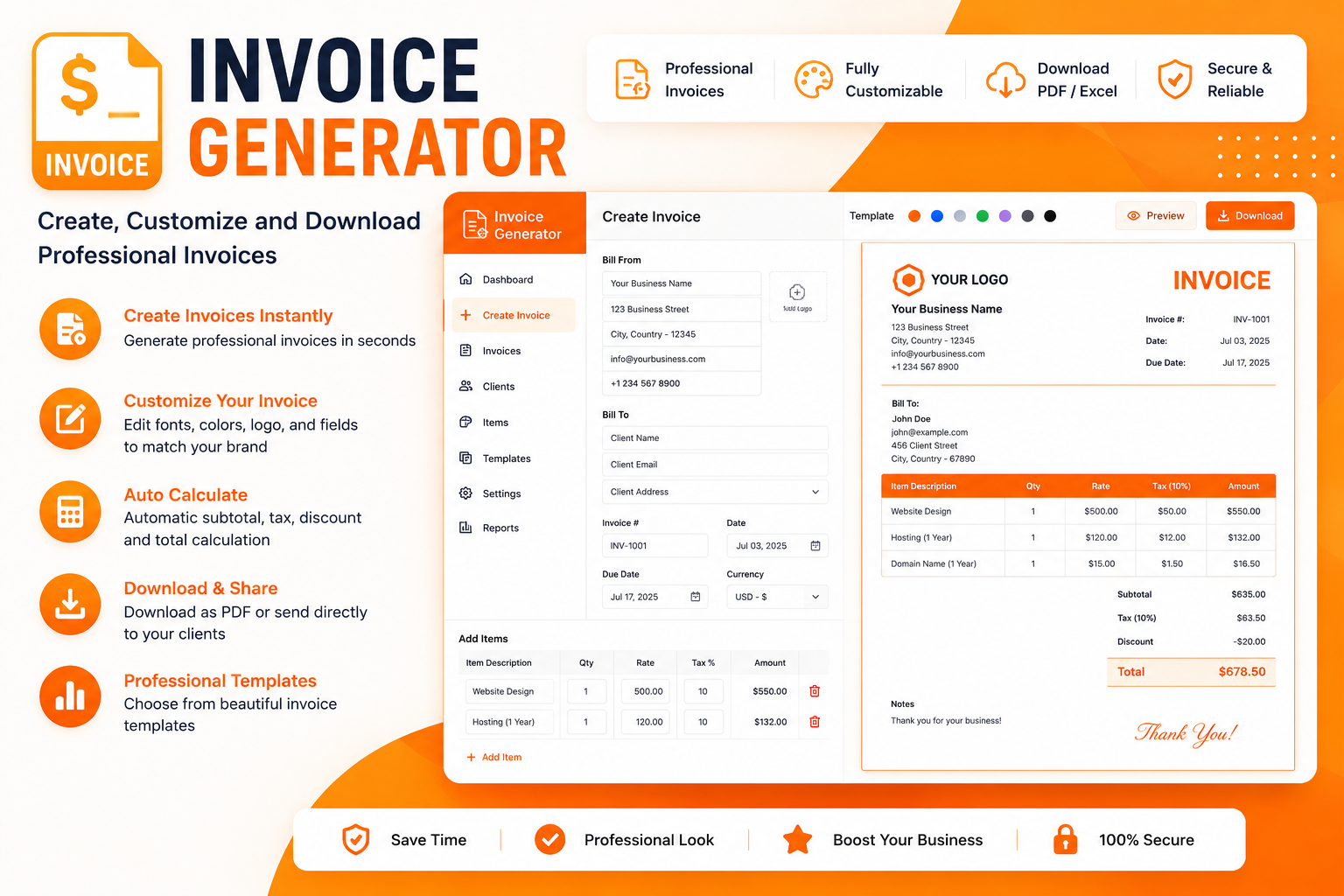
Managing finances efficiently is essential for freelancers, small business owners, and service professionals. A reliable Invoice Generator – Create, Customize & Download Professional Invoices tool simplifies billing, reduces administrative errors, and ensures you get paid faster. Whether you need a basic invoice or a fully branded document with tax calculations, a well-designed invoice maker built with HTML5, CSS, and JavaScript provides the perfect solution. This comprehensive guide explores why client-side invoice generators are transforming how professionals handle billing.
Why Use a Browser-Based Invoice Generator?
The Hidden Costs of Manual Invoicing
Creating invoices manually using word processors or spreadsheets is tedious and error-prone. Common challenges include:
- Manual calculation errors in totals, taxes, and discounts
- Inconsistent branding and formatting across invoices
- Time wasted on repetitive data entry for recurring clients
- Difficulty tracking paid and unpaid invoices
- No professional PDF export without additional tools
A web-based invoice creator eliminates these issues by automating calculations, storing client data, and generating print-ready PDFs in seconds.
The Advantages of Client-Side JavaScript Solutions
Modern invoice generators built with HTML5 and JavaScript offer significant benefits over traditional desktop software or cloud-based platforms:
Core Features of a Professional Invoice Generator
1. Dynamic Form with Auto-Calculation
The heart of any effective billing software is its ability to calculate totals automatically. Modern tools offer:
- Auto-calculation of subtotals: Item quantities and rates update totals in real time
- Multi-tax support: Custom tax labels (VAT, GST, Sales Tax, IVA) with automatic percentage calculations
- Discount and shipping fields: Apply percentage or fixed amount discounts and shipping costs
- Currency formatting: On-the-fly formatting (e.g.,
$1,200.00)
2. Unlimited Line Items
Business needs vary—some invoices have one item, others have dozens. A robust invoice generator tool supports adding unlimited line items with bulk delete capabilities. Each item typically includes:
- Description of the product or service
- Quantity
- Unit price
- Total (calculated automatically)
3. Company and Client Details Management
Efficient billing requires storing information for reuse. Advanced tools offer:
- Saved profiles: Store seller and buyer details for quick selection
- Client database: Reusable customer JSON files eliminate duplicate data entry
- Invoice number and date: Unique numbering with optional auto-numbering that resets monthly
4. Logo and Branding Customization
Professional invoices build trust and reinforce brand identity. Features include:
- Logo upload: Drag-and-drop or click to upload your company logo for instant preview
- Color and font customization: Edit templates to match your brand colors
- Multiple templates: Choose from various designs, including modern Stripe-style layouts
5. PDF Generation and Export Options
The ability to download and share invoices is essential. Popular libraries enable:
- One-click PDF download: Generate print-ready invoices using
html2pdf.js - Print functionality: Directly print invoices from the browser
- Multiple document types: Create estimates, quotations, receipts, credit notes, and delivery notes
- Shareable links: Send invoices directly to clients without attachments
6. Preview Modal
Before finalizing, users need to see exactly how the invoice will appear. A preview modal displays the final invoice layout before export, allowing verification of details.
7. Multi-Language and Multi-Currency Support
For international freelancers and businesses, features include:
- 10+ languages and 120+ currencies with live PDF preview updates
- Currency symbols and formatting that adapt to locale settings
- Custom tax labels that adjust per language
8. Responsive Design
Professionals work from various devices—desktops, tablets, and smartphones. A responsive invoice app ensures:
- Tailwind CSS or similar frameworks for utility-first styling
- Works on iPhone, iPad, and Mac with seamless sync across devices
- Mobile-friendly forms with auto-scroll and improved UX
9. Data Persistence with Local Storage
Privacy and convenience go hand in hand. Client-side invoice generators use:
- Browser localStorage to save all data locally—no cloud storage required
- No data collection: Developers often declare they do not collect any user data
- Face ID or biometric security for mobile apps
10. Advanced Features
For more demanding users, modern tools offer:
- QR codes: Add payment QR codes with custom descriptions and payment links
- Multi-page PDF support: Automatic pagination and page breaks for large invoices
- Advanced filters: Quickly find records using filters and segments
- Payment tracking: Mark invoices as Paid, Unpaid, or Partially Paid
How a JavaScript Invoice Generator Works
Data Input Phase
The process starts with filling in the invoice form. Users provide:
- Invoice details: Number, date, due date
- Company information: Name, address, phone, email, logo
- Client information: Name, company, address, email
- Line items: Description, quantity, rate for each item
- Tax and discounts: Tax rate, discount percentage or amount, shipping
Real-Time Calculation
Behind the scenes, JavaScript performs instant calculations:
javascript
// Example calculation flow
subtotal = items.reduce((sum, item) => sum + (item.qty * item.price), 0);
taxAmount = subtotal * (taxRate / 100);
discountAmount = subtotal * (discountRate / 100);
grandTotal = subtotal + taxAmount - discountAmount + shipping;
Preview Generation
The invoice preview renders the data in a clean, printable HTML format. This can be displayed in a modal or side panel for review before export.
PDF Export
PDF generation typically uses one of two libraries:
- html2pdf.js: Converts HTML content to PDF, preserving styles and layout
- jsPDF: Programmatic PDF creation with more control over positioning
Data Storage
Optional saving to localStorage allows users to:
- Retrieve previous invoices
- Maintain client and company profiles
- Track invoice history
Comparison: Invoice Generator Approaches
| Approach | Pros | Cons | Best For |
|---|---|---|---|
| Manual (Word/Excel) | Familiar interface | Error-prone, time-consuming, no automation | Rare, simple invoices |
| HTML5 & JavaScript Generator | Free, private, offline, no installation, instant PDF | Browser limitations, no multi-user | Freelancers, small businesses, privacy-conscious users |
| Mobile App | On-the-go access, push notifications | Requires installation, may have subscriptions | Remote workers, mobile-first businesses |
| Cloud-Based Platform | Multi-user, team collaboration, integrations | Monthly fees, data stored on servers | Agencies, larger teams |
| CLI Tools (Pacioli) | Fast, scriptable, auto-numbering | Command-line required, less visual | Developers, batch processing |
Practical Implementation: Building Your Own Invoice Generator
Technology Stack Options
Based on existing projects, the most common stack includes:
Core:
- HTML5 for structure
- CSS/Tailwind CSS for styling and responsive design
- JavaScript (ES6) for logic and calculations
Libraries:
Getting Started: Example Code
Using the vanilla-js-invoice-generator package, you can quickly integrate invoice generation:
html
<div id="invoice-container"></div>

<script src="https://cdn.jsdelivr.net/npm/vanilla-js-invoice-generator@latest"></script>
<script>
generateInvoice('invoice-container', {
  companyName: "Your Business Inc",
  companyAddress: "Your City, Country",
  companyPhone: "+1 234567890",
  companyEmail: "info@yourbusiness.com",
  clientName: "Client Name",
  clientCompany: "Client Company",
  clientAddress: "Client Address",
  invoiceDate: "27/06/2026",
  invoiceNumber: "INV-1001",
  items: [
    { name: "Service 1", qty: 1, price: 1000 },
    { name: "Service 2", qty: 2, price: 500 }
  ],
  taxRate: 18
});
</script>
This generates a professional invoice with all details and a Download PDF button automatically.
Template Customization
For more control, you can edit the invoice template HTML directly. Most tools use template syntax like {{variable}} for data injection. Customizations include:
- Changing colors and fonts
- Adding your logo
- Modifying layout structure
- Adding custom fields
Best Practices for Development
Drawing from real-world projects, consider these best practices:
- Progressive Enhancement: Keep legacy code working while gradually replacing it with cleaner modules
- Test Incrementally: Validate each component as you build it
- User Experience Focus: Ensure clear input validation, progress feedback, and keyboard navigation
- Privacy First: Keep all data client-side, with no server transmission
Real-World Applications
Freelancers and Independent Contractors
- Consultants, designers, developers: Bill clients quickly with professional invoices
- Service providers: Create estimates and convert to invoices with one tap
- Remote workers: Access from any device with a browser
Small Business Owners
- E-commerce sellers: Track transactions and generate invoices for customers
- Retail businesses: Create invoices with bank details for faster payments
- Consulting agencies: Manage multiple businesses in one app
Mobile and Remote Businesses
- Field workers: Create and send invoices directly via Email, WhatsApp, or messaging apps
- Offline capabilities: Access and create invoices without an internet connection
Security and Privacy Considerations
Client-Side Data Processing
One of the strongest advantages of HTML5 JavaScript invoice generators is privacy:
- All data remains in the browser —no sensitive client or business data is transmitted
- No cloud integration eliminates potential security risks
- No data collection by the app developer
Export Security
When sharing invoices, consider:
- Watermarks to prevent misuse of official documents
- Confirmation dialogs for unsaved changes
- Secure PDF generation without server involvement
Frequently Asked Questions
Q: What is an Invoice Generator?
A: An Invoice Generator is a tool that creates professional invoices by automatically calculating totals, taxes, and discounts based on user-provided details like client information, services, rates, and quantities. Many browser-based generators handle everything client-side with no installation required.
Q: Is a browser-based invoice generator secure?
A: Yes. Most browser-based invoice generators keep all data locally in your browser’s storage. No information is sent to external servers, ensuring your financial data stays private and secure.
Q: Can I add my company logo to invoices?
A: Absolutely. Most invoice generators support logo upload via drag-and-drop or file selection. You can personalize invoices by adding your business logo for a professional, branded appearance.
Q: How do I generate a PDF invoice?
A: Simply complete the invoice fields, preview the document, and click the Download PDF button. Most tools use html2pdf.js or jsPDF to generate print-ready PDFs instantly.
Q: Can I use an invoice generator offline?
A: Yes. Since everything runs in your browser, many invoice generators work without an internet connection. This is particularly useful for mobile and remote businesses.
Q: Is this tool suitable for larger businesses?
A: While ideal for freelancers and small businesses, client-side invoice generators may not replace full ERP systems. However, they serve as a quick, professional solution for smaller invoicing needs.
Q: What tax types are supported?
A: Modern invoice generators support multiple tax types including VAT, GST, Sales Tax, Service Tax, and withholding tax. Many also allow custom tax labels to match local requirements.
ToolStudio All-in-One Web Tools Script
Conclusion
An Invoice Generator – Create, Customize & Download Professional Invoices built with HTML5 and JavaScript is an indispensable tool for freelancers, small business owners, and service professionals. These browser-based solutions eliminate the chaos of manual billing, automatically handling calculations and generating professional PDFs in seconds.
The HTML5 and JavaScript approach offers the perfect balance of accessibility, privacy, and functionality—no installation, no server costs, and complete data control. Whether you’re building a custom solution or using an existing tool, the benefits are clear: professional invoices, automated calculations, branded documents, and faster payments.
The range of features available in modern invoice generators is impressive: dynamic forms with auto-calculation, unlimited line items, client databases, logo upload, multi-language and multi-currency support, responsive design, and secure local storage. Tools like vanilla-js-invoice-generator and easy-invoice-pdf demonstrate that professional-grade invoicing is accessible to everyone.
Ready to transform your billing process? Start using a client-side invoice generator today and experience the difference between manual calculations and automated efficiency. The result is more time for what truly matters—growing your business and serving your clients.
Related Products


Popular & Trending

Featured Products


